

Modern homes and offices rely on AV (audio/video) equipment every day. But with every new device—TVs, soundbars, game consoles, speakers, computers, and streaming boxes—comes another cord or cable to manage. Before long, entertainment centers, office desks, and conference rooms look more like nests than neat, usable spaces. Tangled, unlabeled cords not only look bad but can also cause real headaches: tripping hazards, wasted time troubleshooting, and accidental unplugging of the wrong device.
The good news? With a small investment in the right cable ties, you can transform your setup from chaotic to calm. Bundling, labeling, and sorting AV cords is not only possible—it’s easy, affordable, and pays off with every movie night, gaming session, or video call.
Why AV Cord Management Matters
Unmanaged cables create more than an eyesore. Over time, cords that are bent, tangled, or knotted can develop internal damage, shortening the lifespan of your expensive AV gear. Unlabeled cables make routine maintenance, upgrades, or troubleshooting a nightmare. In shared spaces—offices, schools, or studios—poor cable management wastes time for everyone.
Good cable management offers practical benefits:
-
Safer spaces, free from tripping or fire hazards
-
Equipment that lasts longer and performs better
-
Faster, easier changes and upgrades
-
Cleaner, more professional appearance
Cable ties are at the heart of this system. When used correctly, they deliver secure, long-term solutions for every kind of AV setup.
The Challenge: So Many Cords, So Little Order
Even a modest home theater can have a dozen cables: HDMI, speaker wire, optical audio, Ethernet, power cords, and more. Add in a sound system or projector, and the count grows quickly. Each type of cable needs its own route, slack, and connector—plus a way to tell it apart from the others.
Office conference rooms add another layer of complexity, with microphones, presentation screens, charging stations, and teleconferencing gear all competing for power and data. Keeping everything safe, organized, and labeled is non-negotiable for smooth operation.
Types of Cable Ties for AV Cords
The market offers more choices than ever. Choosing the right cable ties will make your project easier and your results more durable.
-
Standard nylon cable ties: Affordable, reliable, and available in many lengths and colors.
-
Releasable cable ties: Allow for quick adjustments, moves, or upgrades without cutting and replacing ties.
-
Hook-and-loop (Velcro) ties: Gentle on delicate cords, reusable, and ideal for temporary setups or areas where cables are rearranged often.
-
ID or marker cable ties: Feature a built-in labeling tab for marking cables with permanent markers or pre-printed labels.
-
Color-coded cable ties: Simplify sorting and identifying cables by function, source, or destination.
For most AV setups, a combination of these styles works best. Standard ties are great for permanent runs, while releasable and Velcro ties support regular changes.
Planning Your AV Cable Management Strategy
Jumping in without a plan leads to messy results. The best cable management begins with a quick assessment:
-
Inventory devices and cords: List all your devices and count the cables for each. This avoids missing anything in the process.
-
Group by type and location: Bundle HDMI cables together, separate speaker wires, and keep power cords distinct. Decide where each bundle should run.
-
Allow for slack: Cords should have enough slack to prevent stress on connectors but not so much that they droop or tangle.
-
Label as you go: Every cable gets a label before it disappears behind a TV or inside a rack.
-
Bundle and secure: Use the right cable tie style for each situation—permanent for hidden runs, releasable for visible or regularly-changed areas.
Bundling Cables: Tips for Tidy Runs
Cable ties do their best work when used thoughtfully. Here are a few smart approaches:
-
Bundle cables by function: Keep audio, video, data, and power runs separate. This reduces electromagnetic interference and makes tracing problems easier.
-
Space out ties: Place ties every 8–12 inches along a bundle for neatness and support, but don’t overdo it—too many ties can create pressure points.
-
Leave room for air: Don’t cinch ties too tight. Allow space for cables to “breathe” and to prevent damage.
-
Route along furniture or walls: Run cable bundles along the back of desks, under carpets, or behind wall-mounted racks using adhesive cable tie mounts or clips.
-
Avoid sharp bends: Cables that are forced into tight corners or pinched by overzealous ties can break down over time.
Labeling for Fast Troubleshooting
Labeling is often the step most people skip—and always regret. Every bundled and routed cable should be labeled at both ends. This is a lifesaver during upgrades, repairs, or even when cleaning.
Marker cable ties (with a built-in writable tab) make this easy. Simply use a permanent marker to note the device (“TV,” “Subwoofer,” “Router”) or port (“HDMI 1,” “AUX IN”). For high-turnover offices or studios, printed labels or color-coding may be even more effective.
Sorting and Separating: The Key to Safe AV Setups
Audio and video cables carry sensitive signals. Bundling them with power cords can lead to interference—buzzing speakers, distorted video, or mysterious dropouts. The fix? Always keep low-voltage data and audio cables separate from high-voltage power lines. Use different colored ties to mark the difference, and route them at least a few inches apart.
For extra complex setups, consider running separate bundles along each leg of a desk, or behind different pieces of furniture. The result is a quieter, clearer, and more reliable AV experience.
Must-Have Cable Tie Kit for AV Cord Management
Every AV enthusiast or tech manager should keep this simple kit handy:
-
A selection of standard nylon cable ties in various lengths and colors
-
Releasable ties for bundles that may need regular access or changes
-
Hook-and-loop ties for delicate, high-end cables or portable setups
-
ID/marker cable ties for easy labeling at both ends of every cord
-
Adhesive-backed cable tie mounts for routing cables along walls or furniture
-
Flush cutters or scissors for neat trimming
With this kit, anyone can handle home theaters, studios, or even full-scale AV installations with confidence.
Common Mistakes to Avoid
Cable ties make life easier, but using them wrong can create new problems. Avoid these pitfalls:
-
Overtightening ties: This pinches cables and damages insulation, leading to signal loss or early failure.
-
Bundling power and AV lines together: This introduces electrical noise and can cause performance issues.
-
Ignoring slack: Cables that are too tight may disconnect if devices are moved.
-
Using only one color: This makes troubleshooting harder later.
-
Forgetting to label both ends: Every AV technician has a story about chasing the wrong cable for half an hour.
Regularly check ties for signs of brittleness, stretching, or failure—especially in areas exposed to heat or direct sunlight.
Benefits Beyond Looks: Why Cable Management Pays Off
A tangle-free AV setup is not just about appearances. The real benefits show up every time you use your system:
-
Troubleshooting is faster and easier: Labeled, bundled cords mean you can swap a device or fix a problem in minutes—not hours.
-
Better sound and video: Reduced interference leads to clearer audio and sharper visuals.
-
Longer-lasting equipment: Unstressed, untangled cables wear out more slowly, protecting your investment.
-
Safety for all: Bundled cords prevent trips, falls, and accidental unplugging, especially important in homes with kids or pets.
Product Review: Marker Cable Ties from CableTiesUnlimited.com
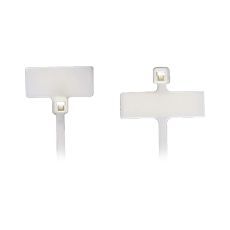
Marker Cable Ties from CableTiesUnlimited.com are the go-to solution for anyone who wants both a tidy look and practical labeling. These nylon cable ties feature a flat, writable tab, making it simple to identify cables and devices at a glance. They’re sturdy, reliable, and available in multiple lengths and colors for organizing even the most complex AV setups.
The writing surface holds permanent marker or printed stickers without smudging or peeling, so your labels stay readable after months or years of use. The locking mechanism is smooth and secure, and the UV-stabilized nylon stands up to home, office, and even light outdoor use. These ties cut down on confusion, save time during troubleshooting, and bring a level of professional polish to any entertainment center, studio, or conference room.
Final Thoughts
Taming AV cord chaos is within reach for everyone. With a handful of the right cable ties—and a little planning—you can create a setup that’s safer, easier to use, and far more attractive. Label, bundle, and sort your cables the smart way, and enjoy the freedom to upgrade, clean, or move devices without stress or confusion.
The next time you add a new device or reorganize your space, reach for your cable tie kit and see just how much simpler your AV life becomes.
For more insights and tips on cable ties and other related products, explore cabletiesunlimited.com, get a quick and free quote, and follow us on our social media communities on Facebook and Instagram!